
Ask AI
Not every question needs an edit. Ask about what you see, such as "what's the path of this image?" or "where is this color defined?", and GUIJam answers with the files involved.
Two ways to ask#
- From fine-tune. Select an element, then click Ask AI in the panel header.
- From Draw. Circle an element and type a question.
Both open the same prompt for that element. Type a change to get variants, or a question to get an answer.
What counts as a question#
GUIJam treats a prompt as a question when it ends with ?, or starts with a word such as what, where, which, who, why, how, when, is, are, does, do, can, could, explain or tell.
A prompt that also contains an edit verb, such as make, change, set, add, remove, replace, use, move, fix or update, is treated as a change request instead. "Can you make it blue?" asks for variants.
The answer#
The answer appears in the panel, next to the element.
An answer about the button
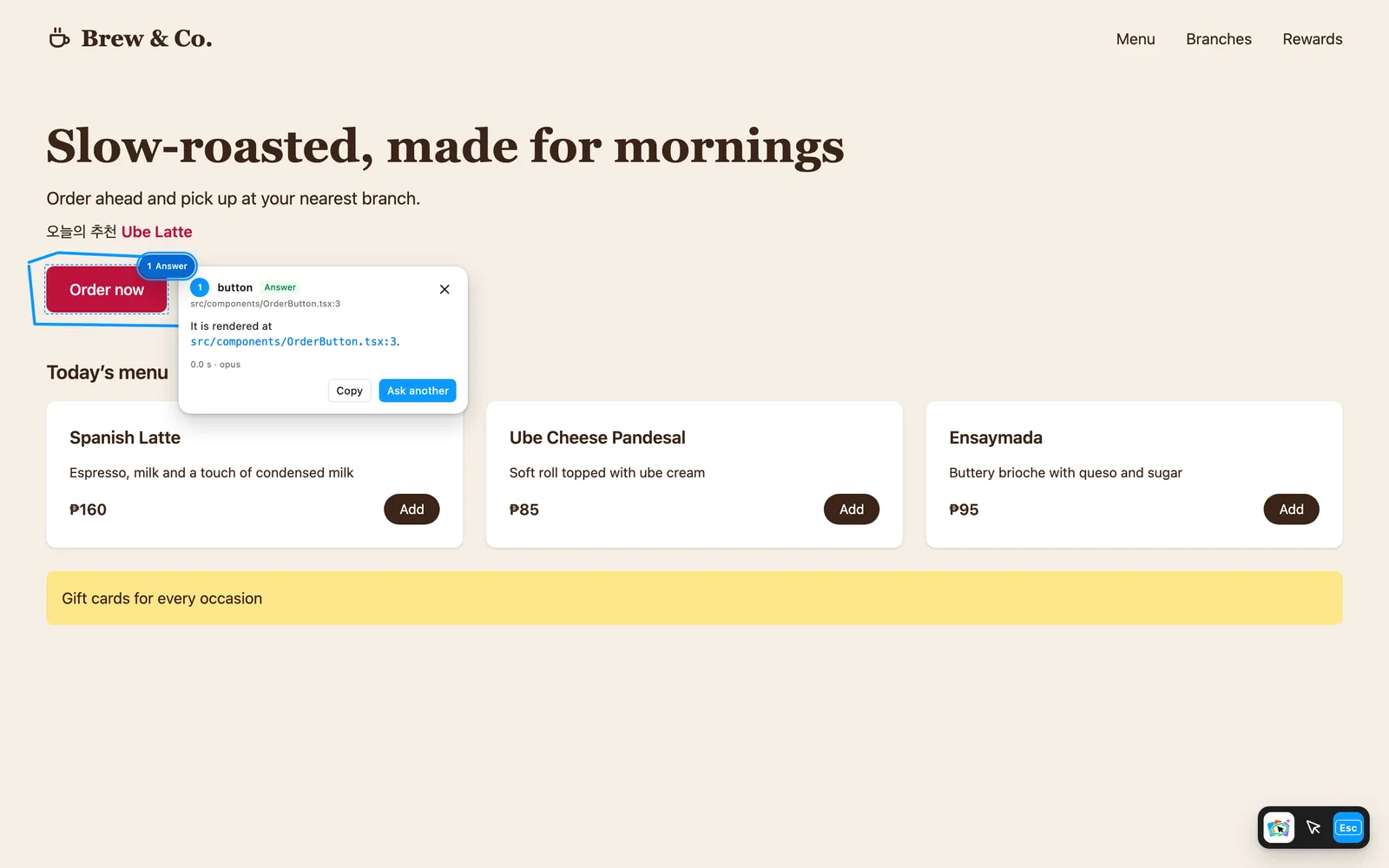
- File paths in the answer are links. Click one to open it in your editor.
- Copy copies the answer.
- Ask another clears the prompt for a follow-up.
Questions run your AI tool the same way edits do: headless, with the relevant code passed in, and no tools that can change files.